


ROADWARRIOR
RW3 WIRELESS OVER-EAR HEADSET
RW3 WIRELESS OVER-EAR HEADSET
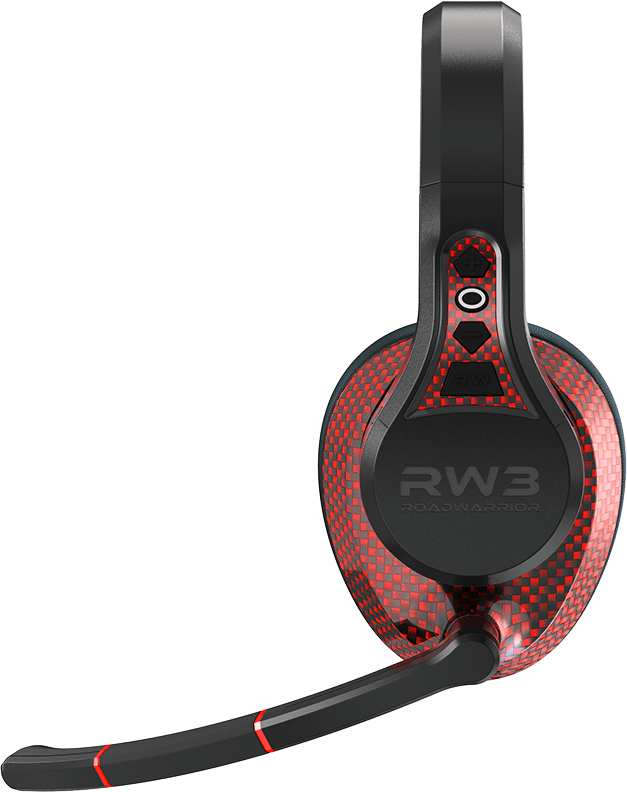
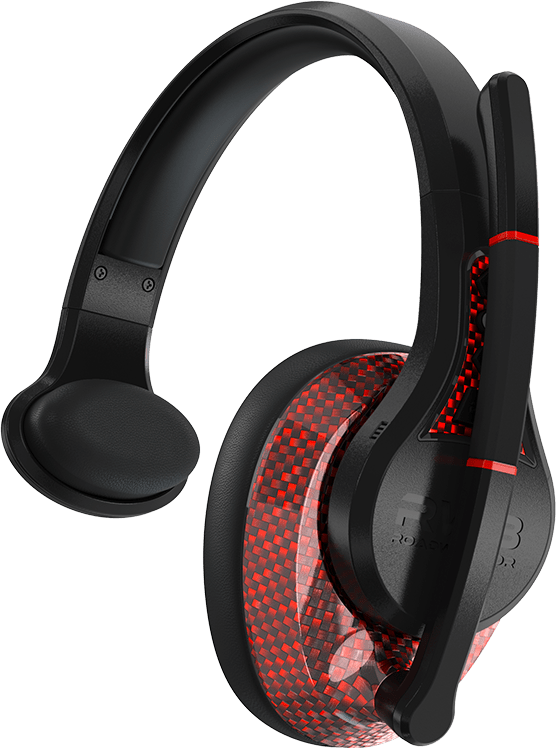
The patent pending RW3 was designed and engineered exclusively for our community of truck drivers. This wireless headset is the Ultimate Headset — beyond comfortable, beyond rugged — finished in a world-class red carbon fiber design. It delivers 50+ hours of battery life and a specially tuned 40mm speaker capable of up to 105 dB of volume, paired with four levels of ANC (Active Noise Cancelling) for extreme audio clarity.
Our proprietary silicone flex microphone boom and 6mm mic capsule utilize Self-Adapting AI ENC technology to deliver, unquestionably, the best call quality on the market. When you’re on the move outside your rig, the RW3 provides over 180+ feet of wireless range, so you’re never out of touch with your smartphone.
The RW3 offers complete hands-free operation with seven individual headset commands, including direct access to Siri and Alexa for full phone control. With RoadWarrior rugged construction, IP54-rated moisture and dust protection, and a full one-year warranty, the RW3 ensures the highest level of reliable communication and performance.
It is the Ultimate Headset.
Check out the RoadWarrior Audio App for full control of your RW3 right from your phone.
Couldn't load pickup availability
- 1-year warranty
-
Free shipping

Delivery times
Express 1-2 business day Standard
(Free over $50+)3-5
business days




Features

Durable RoadWarrior tough construction
with crimson carbon fiber finish

Multiple button functions: pause/play, call/
hang up/ volume up/down, next/previous
track, mute mic, voice assistant and more

180' wireless coverage through BT 6.0 wireless connection technology

Comfortable, memory foam each cushion in premium leatherette

50+ hour talk time (3’ USB-C cable to charge, cable included)

Designed in the USA

ANC: 4 different modes of active noise cancelling to be able to hear more clearly as a driver

ENC: AI Environmental noise cancelling microphone helps block out cab and road noise for those on the other line


LED Battery life
indicator

1 year manufacturer
warranty

IP54 rated for rain, water
splashes, and dust

40mm driver for
powerful sound
Compare Models

RW1
$79.99
- On-Ear Design
- 30 hour talk-time
- 30mm driver
- Siri/Google Assistant compatible
- Durable RoadWarrior tough construction with carbon fiber texture - IP54 certified
- Bluetooth 100-foot range [32 mts] with extended antenna tech
- ENC omni capsule background-noise reducing technology
- Up to 270º flip-down radius for right and left oriented set ups

RW2
$99.99
- Over-Ear Design
- 30 hour talk-time
- 40mm driver
- Siri/Google Assistant compatible
- Durable RoadWarrior tough construction with carbon fiber finish - IP54 certified
- Bluetooth 100-foot range [32 mts] with extended antenna tech
- ENC omni capsule background-noise reducing technology, silicone flex boom
- Up to 270º flip-down radius for right and left oriented set ups

RW3
$159.99
- Over-Ear Design
- 50+ hour talk-time
- 40mm driver
- Siri/Google Assistant compatible
- Durable, RoadWarrior tough construction with crimson carbon fiber finish (IP54)
- Bluetooth 6.0 180 foot range [55 mts] with extended antenna tech
- AI ENC +ANC noise-reducing technology, silicone flex boom with 3 ANC modes
- Up to 270º flip-down radius for right and left oriented set ups
Get the RW3 App
App coming soon
You will soon be able to download it on the Apple App or Google Play stores.

Powerful Sound
Enjoy powerful, immersive sound with a custom-tuned 40mm driver that delivers deep bass, clear mids, and crisp highs. Perfect for long haulers, this driver offers an unbeatable audio experience, bringing your audio to life with vibrant detail and clarity.

Self Adaptive ENC Microphone
Environmental Noise Cancelling technology intelligently cancels out background noise, road, and cabin sounds for crystal-clear calls. Up to 180' wireless connection.

The RW3 Omni capsule microphone captures 360° sound with exceptional clarity, ensuring precise audio pickup from any direction. Complete with silicone flex boom for custom position - up to 270º flip-down radius


Dust & Water
Resistant
With an IP54 rating, this device is fully dust-proof and splash-resistant, offering reliable protection in tough environments. Ideal for outdoor or rugged use, it's built to keep going where other devices might fail.
Product Details
- Speaker frequency: 20Hz-20,000KHz
- Speaker Sensitivity: 105dB ± 3dB
ANC Level One: -20db+\-3db
ANC Level Two: -30db+\-3db - Speaker Impedance: 32 ohms
- Driver Size: 40 mm
- Microphone type: Omnicapsule
- Microphone range: 100Hz - 10,000KHz
- Microphone sensitivity: -23±3dB
- Maximum paired devices: Can remember up to 8 devices while paired to up to two devices at the same time (multi-pairing)
- Style: Over Ear
- Talk Time: Up to 50+ hours
- Standby time: Up to 200+ hours
- Charge time: Approximately 2 hours
- Charging cable: 3’ USB-C Charging Cable
- Bluetooth Compliance: Bluetooth version 6.0
- Operating Range: 180’+ [55 MTS]
- Dimensions: 8.07 x 3.35 x 7.48 inches
- Weight: 6.50 oz
- Certifications: Bluetooth 6.0, FCC, RoHS, IC, CEC, REACH
- RW3 Headset
- 3’ USB-C Charging Cable
- Quickstart Guide
- Mic Windscreen
How to pair your RW3 device?
A: Ensure Bluetooth is enabled on your device, then select “ROADWARRIOR RW3” from the list of available devices.
How do I check my battery level?
A: A LED light on the Power Button will be blue when fully charged 100%, green when half charged 50%, and red when at less than 10% charge.
Do I have to turn on Environmental Noise Cancelling?
A: No, Environmental Noise Cancelling is active as soon as the RW3 headset is powered on.
How do I activate Siri/Google Assistant?
A: To activate Google Assistant or Siri, hold the RW Button for 2 seconds until the technology is online
How do I enable Active Noise Canceling?
A: Make sure the RW3 headset is powered on and connected to your device. Tap the RW button and release to toggle between ANC off, ANC mode 1, 2, and transparency mode.
Why RoadWarrior

Delivery times
| Express | 1-2 business day |
| Standard (Free over $50+) |
3-5 business days |

Warranty
The RW3 headset comes with a one-year manufacturer’s Warranty. Visit the link below for full warranty policy.
View Warranty Policy
THE ULTIMATE HEADSET IS HERE - RW3
For those early mornings, long days, and late nights trying to stay connected, its imperative you pick the right tool for the job. The RoadWarrior RW3 was designed from the...
THE ULTIMATE HEADSET IS HERE - RW3
For those early mornings, long days, and late nights trying to stay connected, its imperative you pick the right tool for the job. The RoadWarrior RW3 was designed from the...
Read More
MEET THE RW2 : A RUGGED OVER-EAR WIRELESS HEADS...
When you spend life behind the wheel, your headset is more than just an accessory, it’s an extension of you. For long-haul truckers, regional drivers, and local delivery pros, a...
MEET THE RW2 : A RUGGED OVER-EAR WIRELESS HEADS...
When you spend life behind the wheel, your headset is more than just an accessory, it’s an extension of you. For long-haul truckers, regional drivers, and local delivery pros, a...
Read More
FIND ROADWARRIOR AUDIO TRUCKER HEADSETS NEAR YO...
When you’re living life on the road, your gear needs to keep up. A reliable trucking headset isn’t just a nice-to-have it’s essential for clear calls, safer driving, and staying...
FIND ROADWARRIOR AUDIO TRUCKER HEADSETS NEAR YO...
When you’re living life on the road, your gear needs to keep up. A reliable trucking headset isn’t just a nice-to-have it’s essential for clear calls, safer driving, and staying...
Read More
THE ULTIMATE GUIDE TO ENC: WHY ENVIRONMENTAL NO...
Long-haul transportation demands reliable communication and safety on every journey. One technology that has significantly improved communication for truckers is Environmental Noise Cancellation (ENC). We'll explain what ENC is, why...
THE ULTIMATE GUIDE TO ENC: WHY ENVIRONMENTAL NO...
Long-haul transportation demands reliable communication and safety on every journey. One technology that has significantly improved communication for truckers is Environmental Noise Cancellation (ENC). We'll explain what ENC is, why...
Read More
MEET THE RW1
As a long-haul trucker, day hauler, last-mile driver, or local delivery, your headset is more than just a gadget—it's your lifeline on the road. Whether handling dispatch calls, staying in...
MEET THE RW1
As a long-haul trucker, day hauler, last-mile driver, or local delivery, your headset is more than just a gadget—it's your lifeline on the road. Whether handling dispatch calls, staying in...
Read More
WHAT MAKES A GREAT LONG HAUL HEADSET
Maintaining focus on the road while managing communications is crucial for every trucker. A reliable headset helps you do just that by allowing hands-free operation
WHAT MAKES A GREAT LONG HAUL HEADSET
Maintaining focus on the road while managing communications is crucial for every trucker. A reliable headset helps you do just that by allowing hands-free operation
Read More